CS:APP 11장 네트워크 프로그래밍 & Proxy 서버 C언어로 구현
웹 검색, 이메일, 온라인 게임 등 우리가 쓰는 모든 것은 네트워크 응용이다. 소켓 인터페이스부터 Tiny 웹 서버, 프록시 서버까지 직접 구현해본다.
- 1. 클라이언트-서버 프로그래밍 모델
- 2. 네트워크 구조
- 3. 글로벌 IP 인터넷
- 4. 소켓 인터페이스
- 5. Echo 클라이언트와 서버
- 6. 웹 기초
- 7. 소형 웹 서버 (Tiny)
- 8. 웹 프록시 서버
- 9. 프록시 서버: 쓰레딩 + 캐싱
모든 네트워크 응용은 동일한 기본 프로그래밍 모델에 기초하며, 비슷한 논리 구조와 동일한 프로그래밍 인터페이스(소켓)를 쓴다. 이 글에서는 개념을 정리한 뒤 그것들을 엮어 작지만 실제로 동작하는 웹 서버와 프록시 서버를 만든다.
1. 클라이언트-서버 프로그래밍 모델
모든 네트워크 응용은 클라이언트-서버 모델에 기초한다. 한 개의 서버 프로세스와 한 개 이상의 클라이언트 프로세스로 구성된다.
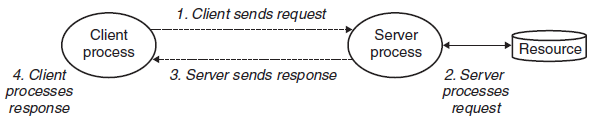
| 순서 | 동작 | 예시 (웹) |
|---|---|---|
| 1 | 클라이언트가 요청(request)을 보내 트랜잭션 개시 | 브라우저가 파일이 필요해 서버에 요청 |
| 2 | 서버가 요청을 받아 해석하고 자원을 조작 | 웹 서버가 디스크 파일을 읽음 |
| 3 | 서버가 응답(response)을 보내고 다음 요청 대기 | 웹 서버가 파일을 클라이언트로 반환 |
| 4 | 클라이언트가 응답을 받아 처리 | 브라우저가 페이지를 화면에 표시 |
2. 네트워크 구조
네트워크는 지리적 위치에 따른 계층구조 시스템이다. 하위 수준은 빌딩·캠퍼스 규모의 LAN(Local Area Network) 이며, 가장 대중적인 LAN 기술은 이더넷(Ethernet)이다.
2-1. NIC (Network Interface Card)
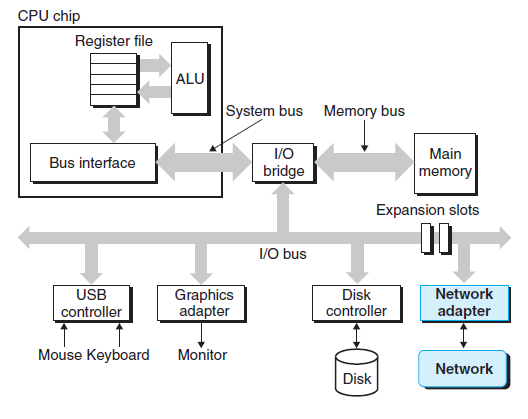
호스트 입장에서 네트워크는 또 다른 I/O 디바이스일 뿐이다. 네트워크에서 수신한 데이터는 I/O·메모리 버스를 거쳐 어댑터에서 메모리로 (대개 DMA 전송으로) 복사되며, 반대 방향도 가능하다.
2-2. 이더넷 (Ethernet)
이더넷 세그먼트는 몇 개의 전선과 허브라는 작은 상자로 구성된다. 한쪽 끝은 호스트 어댑터에, 다른 끝은 허브 포트에 연결되며, 허브는 한 포트에서 받은 모든 비트를 다른 모든 포트로 복사한다.
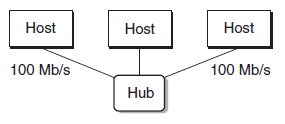
- 이더넷 어댑터는 비휘발성 메모리에 저장된 전체적으로 고유한 48비트 주소를 가진다
- 호스트는 프레임(frame) 단위로 비트를 다른 호스트에 보낸다
- 각 프레임은 소스·목적지·길이를 식별하는 고정 헤더 비트 뒤에 데이터 비트가 이어진다
- 모든 어댑터가 프레임을 볼 수 있지만, 목적지 호스트만 실제로 읽어들인다
더 큰 LAN — 브릿지의 등장
전선과 브릿지라는 작은 상자로 여러 이더넷 세그먼트를 연결하면, 브릿지형 이더넷이라는 더 큰 LAN을 구성할 수 있다.
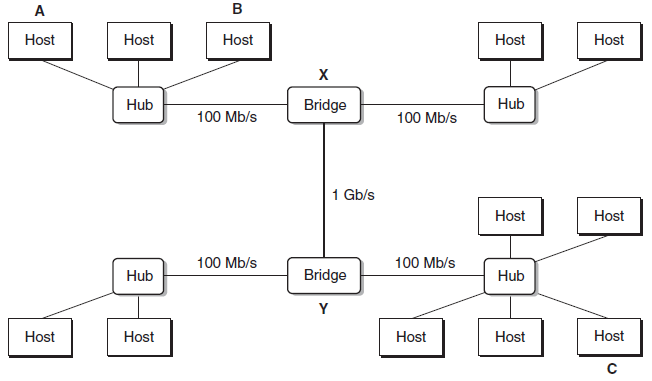
일부 선은 브릿지끼리, 다른 선은 브릿지-허브를 잇는다. 선마다 대역폭이 다를 수 있다(예: 브릿지-브릿지 1Gb/s, 허브-브릿지 100Mb/s).
브릿지와 허브의 차이:
| 장비 | 동작 |
|---|---|
| 허브 | 한 포트에서 받은 모든 비트를 다른 모든 포트로 무조건 복사 |
| 브릿지 | 분산 알고리즘으로 필요한 경우에만 선택적으로 한 포트에서 다른 포트로 프레임 복사 (대역폭도 더 높음) |
2-3. WAN (Wide Area Network)
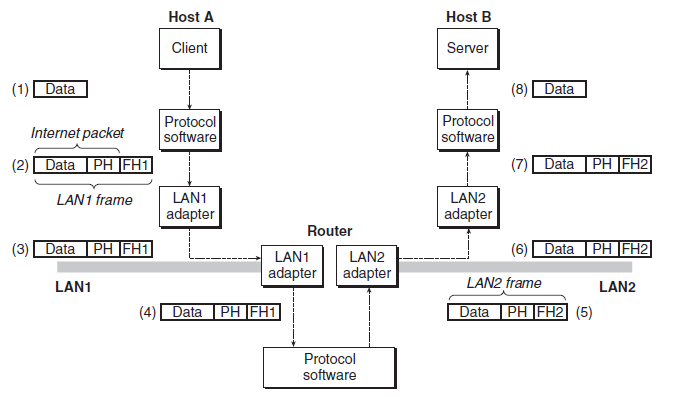
계층 상부에서, 서로 비호환적인 여러 LAN은 라우터라는 특별한 컴퓨터로 연결된다. 라우터는 네트워크 간 연결(상호연결 네트워크)을 구성하며, 각 네트워크마다 어댑터(포트)를 가진다. 고속 point-to-point 연결로 LAN보다 넓은 지역을 잇는 네트워크가 바로 WAN이다.
2-4. internet
internet의 핵심 특성은 서로 다르고 비호환적인 기술의 LAN·WAN들로 이루어져 있다는 점이다. 이를 연결하기 위해 internet 프로토콜은 두 가지 기능을 제공한다.
| 기능 | 설명 |
|---|---|
| 명명법 (Naming Scheme) | 호스트 주소의 통일된 포맷을 정의해 기술 차이를 줄임 |
| 전달기법 (Delivery Mechanism) | 데이터 비트를 패킷(packet) 이라는 단위로 묶는 통일된 방법 정의. 패킷은 크기·소스·목적지 주소를 담은 헤더 + 데이터로 구성되며, Datagram이라고도 부름 |
3. 글로벌 IP 인터넷
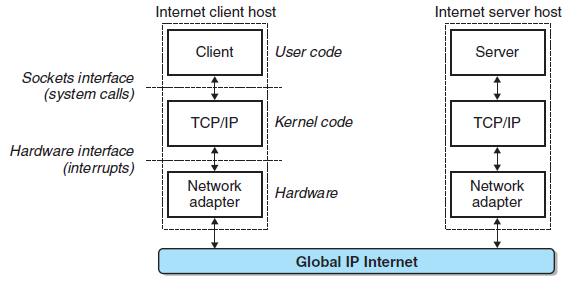
인터넷 클라이언트-서버 응용의 기본 하드웨어·소프트웨어 구조는 1980년대 이후로 안정적이었다. 각 호스트는 TCP/IP 프로토콜을 구현한 소프트웨어를 실행한다.
관련 프로토콜은 HTTP, TCP, UDP를 참고하자.
3-1. IP 주소
IPv4 주소는 부호 없는 32비트 정수이며, 다음 구조체에 저장한다.
/* IP address structure */
struct in_addr {
    uint32_t s_addr; /* Address in network byte order (big-endian) */
};
TCP/IP는 패킷 헤더의 모든 정수형 데이터에 대해 통일된 Network Byte Order(Big Endian) 를 정의한다.
| 방식 | 저장 순서 | 사용처 |
|---|---|---|
| Big Endian | 최상위 바이트를 가장 낮은 주소에 저장 | 네트워크 바이트 순서 |
| Little Endian | 최하위 바이트를 가장 낮은 주소에 저장 | x86, ARM 등 현대 CPU 대부분 |
Dotted-decimal
사람이 읽기 쉽도록 각 바이트를 십진수로 쓰고 점으로 구분하는 표기다.
linux> hostname -i
128.2.210.175
3-2. 인터넷 도메인 이름
DNS(Domain Name System) 는 도메인 이름 집합과 IP 주소 집합 사이의 매핑을 정의한다. 매핑은 네 가지 형태가 있다.
- 도메인 이름 ↔ IP 주소 일대일 매핑
linux> nslookup whaleshark.ics.cs.cmu.edu
Address: 128.2.210.175
- 여러 도메인 이름 → 하나의 IP
linux> nslookup cs.mit.edu
Address: 18.62.1.6
linux> nslookup eecs.mit.edu
Address: 18.62.1.6
- 여러 도메인 이름 → 여러 IP
linux> nslookup www.twitter.com
Address: 199.16.156.6
Address: 199.16.156.70
Address: 199.16.156.102
Address: 199.16.156.230
- 일부 유효한 도메인 이름은 어떤 IP에도 매핑되지 않음
linux> nslookup edu
*** Can't find edu: No answer
3-3. 인터넷 연결
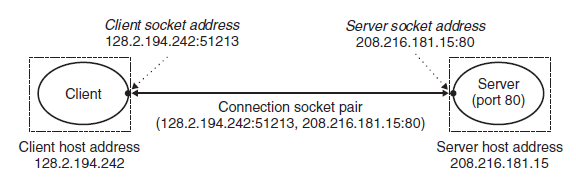
인터넷 클라이언트와 서버는 연결(connection) 을 통해 바이트 스트림을 주고받는다. 이 연결은 두 프로세스를 잇는 point-to-point 이고, 양방향 동시 통신이 가능한 완전양방향(full-duplex) 이다.
- 소켓(Socket) 은 연결의 종단점이다
- 각 소켓은 인터넷 주소 + 16비트 포트로 이루어진 소켓 주소를 가지며,
address:port로 표기한다 - 클라이언트 포트는 연결 요청 시 커널이 자동 할당하는 단기(Ephemeral) 포트다
- 서버는 서비스에 연관된 well-known 포트를 사용한다
- 하나의 연결은 양 종단점의 소켓 주소 쌍(소켓 쌍)으로 유일하게 식별된다
4. 소켓 인터페이스
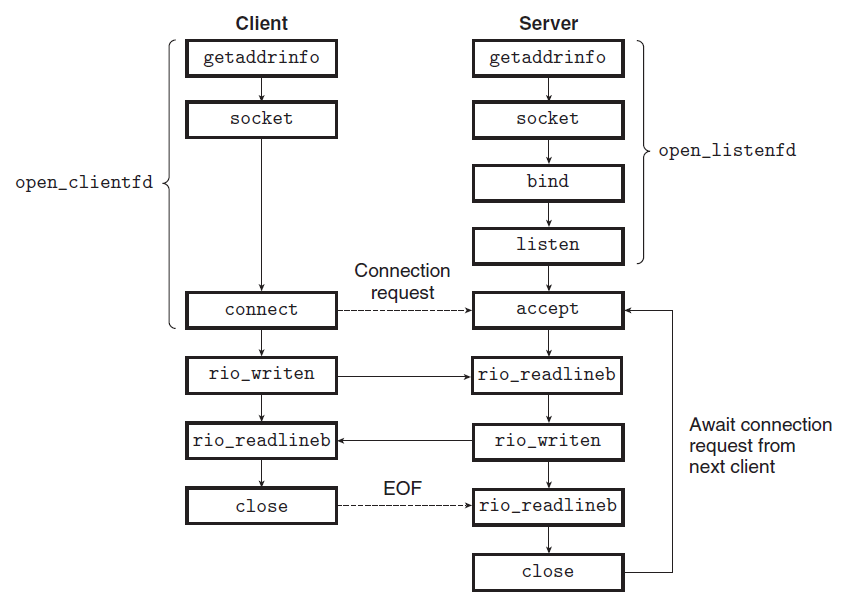
소켓 인터페이스는 Unix I/O 함수들과 함께 네트워크 응용을 만드는 함수 집합으로, 대부분의 현대 시스템에서 구현되어 있다.
4-1. 소켓 주소 구조체
리눅스 커널 관점에서 소켓은 통신의 끝점이고, Unix 프로그램 관점에서는 식별자를 가진 열린 파일이다(네트워크도 파일처럼 다뤄진다).
/* IP socket address structure */
struct sockaddr_in {
    uint16_t sin_family;       /* Protocol family (always AF_INET) */
    uint16_t sin_port;         /* Port number in network byte order */
    struct in_addr sin_addr;   /* IP address in network byte order */
    unsigned char sin_zero[8]; /* Pad to sizeof(struct sockaddr) */
};

/* Generic socket address structure (for connect, bind, accept) */
struct sockaddr {
    uint16_t sa_family; /* Protocol family */
    char sa_data[14];   /* Address data */
};
sockaddr_in은 IPv4 전용 구조체, sockaddr은 TCP·IPv4·IPv6·UDP 등 범용 구조체다. 전자를 후자로 캐스팅할 때 다음 타입을 쓴다.
typedef struct sockaddr SA;
4-2. 주요 함수
각 함수의 역할을 먼저 표로 정리하면 다음과 같다.
| 함수 | 사용 주체 | 역할 |
|---|---|---|
socket |
client·server | 소켓 식별자 생성 (커널 소켓 자료구조의 핸들) |
connect |
client | 서버와 연결 수립 (성공/에러까지 블록) |
bind |
server | 서버 소켓 주소를 식별자에 연결 |
listen |
server | 능동 소켓을 듣기 소켓으로 변환 |
accept |
server | 연결 요청을 기다려 연결 식별자 반환 |
int socket(int domain, int type, int protocol);
/* Returns: nonnegative descriptor if OK, −1 on error */

int connect(int clientfd, const struct sockaddr *addr, socklen_t addrlen);
/* Returns: 0 if OK, −1 on error */

int bind(int sockfd, const struct sockaddr *addr, socklen_t addrlen);
/* Returns: 0 if OK, −1 on error */

int listen(int sockfd, int backlog);
/* Returns: 0 if OK, −1 on error */

int accept(int listenfd, struct sockaddr *addr, int *addrlen);
/* Returns: nonnegative connected descriptor if OK, −1 on error */
connect가 성공하면 clientfd는 읽기/쓰기 준비가 되며, 연결은 소켓 쌍 (x:y, addr.sin_addr:addr.sin_port)로 규정된다.
듣기 식별자 vs 연결 식별자
이 둘의 구분이 자주 헷갈린다.
| 식별자 | 역할 | 수명 |
|---|---|---|
| 듣기 식별자 (listenfd) | 클라이언트 연결 요청의 끝점 | 한 번 생성되어 서버가 사는 동안 유지 |
| 연결 식별자 (connfd) | 성립된 연결의 끝점 | 연결 수락마다 생성, 서비스하는 동안만 존재 |
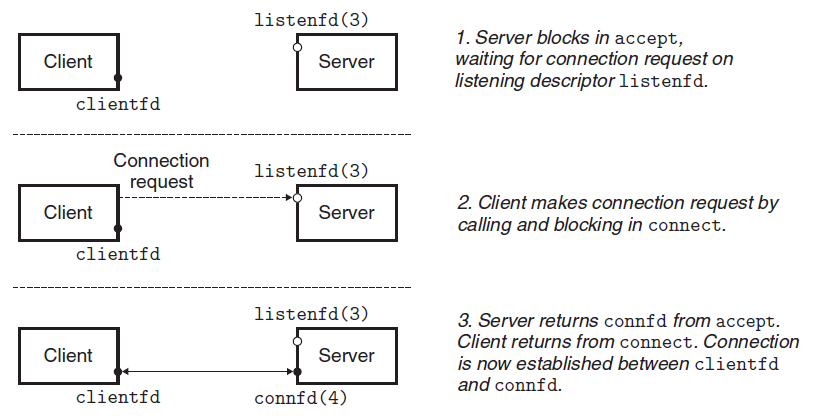
- server가
accept를 호출해 연결 요청이 듣기 식별자(가정: 식별자 3)에 도달하기를 기다린다 (식별자 0~2는 표준 파일용) - client가
connect를 호출해 listenfd로 연결 요청을 보낸다 accept가 새 연결 식별자 connfd(가정: 식별자 4)를 열어 연결을 수립하고 응용에 반환한다. 이제 client/server는 clientfd와 connfd를 읽고 쓰며 데이터를 주고받는다
4-3. 호스트·서비스 변환: getaddrinfo & getnameinfo
리눅스는 IP 버전에 의존하지 않는 네트워크 프로그램을 짤 수 있게 해주는 강력한 변환 함수를 제공한다.
int getaddrinfo(const char *host, const char *service,
                const struct addrinfo *hints, struct addrinfo **result);
/* Returns: 0 if OK, nonzero error code on error */

void freeaddrinfo(struct addrinfo *result);
const char *gai_strerror(int errcode);
getaddrinfo는 host와 service를 받아, 대응되는 소켓 주소 구조체들을 가리키는 addrinfo 연결 리스트를 result로 반환한다.
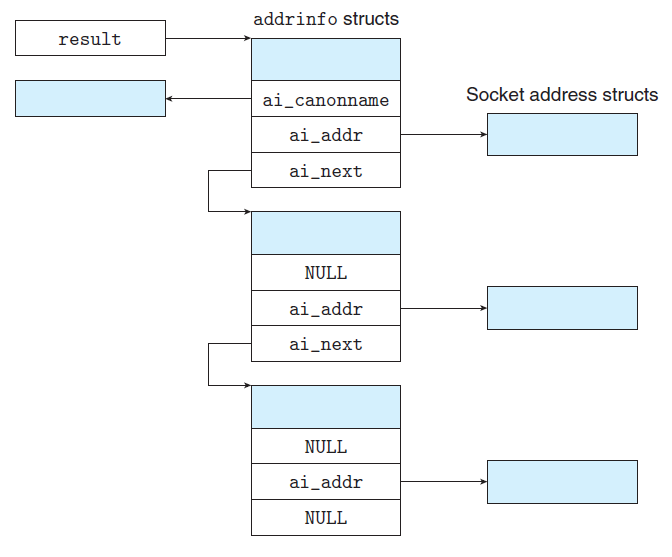
연결 리스트로 반환하는 이유는, 하나의 IP 접속이 실패할 수 있어 백업용으로 여러 IP를 포함하기 위함이다.
struct addrinfo {
    int ai_flags;             /* Hints argument flags */
    int ai_family;            /* First arg to socket function */
    int ai_socktype;          /* Second arg to socket function */
    int ai_protocol;          /* Third arg to socket function */
    char *ai_canonname;       /* Canonical hostname */
    size_t ai_addrlen;        /* Size of ai_addr struct */
    struct sockaddr *ai_addr; /* Ptr to socket address structure */
    struct addrinfo *ai_next; /* Ptr to next item in linked list */
};
getnameinfo는 그 역으로, 소켓 주소 구조체를 host·service 이름 스트링으로 변환한다.
int getnameinfo(const struct sockaddr *sa, socklen_t salen,
                char *host, size_t hostlen,
                char *service, size_t servlen, int flags);
/* Returns: 0 if OK, nonzero error code on error */
4-4. open_clientfd / open_listenfd
위 함수들을 묶어, client는 open_clientfd로 연결을 설정하고 server는 open_listenfd로 듣기 식별자를 만든다.
int open_clientfd(char *hostname, char *port) {
    int clientfd;
    struct addrinfo hints, *listp, *p;

    /* Get a list of potential server addresses */
    memset(&hints, 0, sizeof(struct addrinfo));
    hints.ai_socktype = SOCK_STREAM; /* Open a connection */
    hints.ai_flags = AI_NUMERICSERV; /* ... using a numeric port arg. */
    hints.ai_flags |= AI_ADDRCONFIG; /* Recommended for connections */
    Getaddrinfo(hostname, port, &hints, &listp);

    /* Walk the list for one that we can successfully connect to */
    for (p = listp; p; p = p->ai_next) {
        if ((clientfd = socket(p->ai_family, p->ai_socktype, p->ai_protocol)) < 0)
            continue; /* Socket failed, try the next */
        if (connect(clientfd, p->ai_addr, p->ai_addrlen) != -1)
            break; /* Success */
        Close(clientfd); /* Connect failed, try another */
    }

    /* Clean up */
    Freeaddrinfo(listp);
    if (!p) /* All connects failed */
        return -1;
    else /* The last connect succeeded */
        return clientfd;
}
int open_listenfd(char *port) {
    struct addrinfo hints, *listp, *p;
    int listenfd, optval=1;

    /* Get a list of potential server addresses */
    memset(&hints, 0, sizeof(struct addrinfo));
    hints.ai_socktype = SOCK_STREAM;             /* Accept connections */
    hints.ai_flags = AI_PASSIVE | AI_ADDRCONFIG; /* ... on any IP address */
    hints.ai_flags |= AI_NUMERICSERV;            /* ... using port number */
    Getaddrinfo(NULL, port, &hints, &listp);

    /* Walk the list for one that we can bind to */
    for (p = listp; p; p = p->ai_next) {
        if ((listenfd = socket(p->ai_family, p->ai_socktype, p->ai_protocol)) < 0)
            continue; /* Socket failed, try the next */

        /* Eliminates "Address already in use" error from bind */
        Setsockopt(listenfd, SOL_SOCKET, SO_REUSEADDR,
                   (const void *)&optval, sizeof(int));

        if (bind(listenfd, p->ai_addr, p->ai_addrlen) == 0)
            break; /* Success */
        Close(listenfd); /* Bind failed, try the next */
    }

    /* Clean up */
    Freeaddrinfo(listp);
    if (!p) /* No address worked */
        return -1;

    /* Make it a listening socket ready to accept connection requests */
    if (listen(listenfd, LISTENQ) < 0) {
        Close(listenfd);
        return -1;
    }
    return listenfd;
}
5. Echo 클라이언트와 서버
client가 보낸 데이터를 server가 그대로 되돌려주는 예제다. 먼저 교재 예제를 따라 구현했다.
echoclient.c
#include "csapp.h"

int main(int argc, char **argv)
{
    int clientfd;
    char *host, *port, *buf[MAXLINE];
    rio_t rio;

    if (argc != 3) {
        fprintf(stderr, "usage: %s <host> <port>\n", argv[0]);
        exit(0);
    }
    host = argv[1];
    port = argv[2];

    clientfd = Open_clientfd(host, port);
    Rio_readinitb(&rio, clientfd);

    while (Fgets(buf, MAXLINE, stdin) != NULL) {
        Rio_writen(clientfd, buf, strlen(buf));   // 서버로 전송
        Rio_readlineb(&rio, buf, MAXLINE);        // 서버 응답 수신
        Fputs(buf, stdout);
    }
    Close(clientfd);
    exit(0);
}
echoserveri.c — 한 번에 한 client씩 반복 처리하는 반복 서버(iterative server) 다.
#include "csapp.h"

void echo(int connfd);

int main(int argc, char **argv)
{
    int listenfd, connfd;
    socklen_t clientlen;
    struct sockaddr_storage clientaddr;
    char client_hostname[MAXLINE], client_port[MAXLINE];

    if (argc != 2) {
        fprintf(stderr, "usage: %s <port>\n", argv[0]);
        exit(0);
    }

    listenfd = Open_listenfd(argv[1]);
    while (1) {
        clientlen = sizeof(struct sockaddr_storage);
        connfd = Accept(listenfd, (SA *)&clientaddr, &clientlen);
        Getnameinfo((SA *)&clientaddr, clientlen, client_hostname, MAXLINE,
                    client_port, MAXLINE, 0);
        printf("Connected to (%s, %s)\n", client_hostname, client_port);
        echo(connfd);
        Close(connfd);
    }
    exit(0);
}
echo.c
#include "csapp.h"

void echo(int connfd)
{
    size_t n;
    char buf[MAXLINE];
    rio_t rio;

    Rio_readinitb(&rio, connfd);
    while ((n = Rio_readlineb(&rio, buf, MAXLINE)) != 0) {
        printf("server received %zu bytes\n", n);
        Rio_writen(connfd, buf, n);  // 받은 데이터를 그대로 반환 (Echo!)
    }
}
6. 웹 기초
웹 client와 server는 텍스트 기반 응용수준 프로토콜인 HTTP로 상호 연동한다. FTP 같은 전통적 파일 전송과의 주요 차이는, 웹 콘텐츠가 HTML(Hypertext Markup Language) 로 작성될 수 있다는 점이다. HTML의 태그는 브라우저에게 텍스트·그래픽 객체를 어떻게 표시할지 알려준다.
6-1. 웹 콘텐츠
콘텐츠는 연관된 MIME 타입을 갖는 바이트 배열이다.
| MIME type | Description |
|---|---|
| text/html | HTML page |
| text/plain | Unformatted text |
| application/postscript | Postscript document |
| image/gif | GIF 인코딩 이미지 |
| image/png | PNG 인코딩 이미지 |
| image/jpeg | JPEG 인코딩 이미지 |
웹 서버는 두 방식으로 콘텐츠를 제공한다.
| 종류 | 방식 |
|---|---|
| 정적 콘텐츠 | 디스크 파일을 읽어 그대로 client에게 전송 |
| 동적 콘텐츠 | 실행 파일을 돌려 그 출력을 client에게 전송 |
서버가 반환하는 모든 내용은 URL(Universal Resource Locator) 이라는 고유 이름을 가진다. 예를 들어,
https://www.google.com:80/index.html
| 부분 | 값 | 역할 |
|---|---|---|
| 접두어 | https://www.google.com:80 |
서버 종류·위치·포트 결정 |
| 접미어 | /index.html |
파일 시스템에서 파일 검색, 정적/동적 여부 결정 |
실행 파일 URL은 ?로 파일명과 인자를 구분하고, 각 인자는 &로 나눈다. 예: .../cgi-bin/adder?15000&213은 adder를 인자 15000, 213과 함께 호출한다.
6-2. 동적 콘텐츠 처리
(이 부분은 추후 더 깊이 정리할 예정)
7. 소형 웹 서버 (Tiny)
GET 메서드로 정적·동적 콘텐츠를 제공하는 반복형 HTTP/1.0 서버다. 흐름은 doit(요청 1사이클) → parse_uri(정적/동적 판별) → serve_static / serve_dynamic으로 이어진다.
/*
 * tiny.c - A simple, iterative HTTP/1.0 Web server that uses the
 *     GET method to serve static and dynamic content.
 */
#include "csapp.h"

void doit(int fd);
void read_requesthdrs(rio_t *rp);
int parse_uri(char *uri, char *filename, char *cgiargs);
void serve_static(int fd, char *filename, int filesize);
void get_filetype(char *filename, char *filetype);
void serve_dynamic(int fd, char *filename, char *cgiargs);
void clienterror(int fd, char *cause, char *errnum, char *shortmsg,
                 char *longmsg);

int main(int argc, char **argv)
{
    int listenfd, connfd;
    char hostname[MAXLINE], port[MAXLINE];
    socklen_t clientlen;
    struct sockaddr_storage clientaddr;

    if (argc != 2) {
        fprintf(stderr, "usage: %s <port>\n", argv[0]);
        exit(1);
    }

    listenfd = Open_listenfd(argv[1]);
    while (1) {
        clientlen = sizeof(clientaddr);
        connfd = Accept(listenfd, (SA *)&clientaddr, &clientlen);
        Getnameinfo((SA *)&clientaddr, clientlen, hostname, MAXLINE, port, MAXLINE, 0);
        printf("Accepted connection from (%s, %s)\n", hostname, port);
        doit(connfd);
        Close(connfd);
    }
}

/* 요청을 읽고 응답을 보내는 한 사이클 */
void doit(int fd)
{
    int is_static;
    struct stat sbuf;
    char buf[MAXLINE], method[MAXLINE], uri[MAXLINE], version[MAXLINE];
    char filename[MAXLINE], cgiargs[MAXLINE];
    rio_t rio;

    /* 요청 라인 읽기: 예) GET /index.html HTTP/1.1 */
    Rio_readinitb(&rio, fd);
    Rio_readlineb(&rio, buf, MAXLINE);
    printf("Request line: %s", buf);
    sscanf(buf, "%s %s %s", method, uri, version);

    /* GET 이외 메서드는 거절 */
    if (strcasecmp(method, "GET")) {
        clienterror(fd, method, "501", "Not implemented",
                    "Tiny does not implement this method");
        return;
    }

    read_requesthdrs(&rio); /* 나머지 헤더는 읽고 무시 */

    /* URI 파싱 (정적/동적 판별) */
    is_static = parse_uri(uri, filename, cgiargs);

    /* 파일 존재 확인 */
    if (stat(filename, &sbuf) < 0) {
        clienterror(fd, filename, "404", "Not found",
                    "Tiny couldn't find this file");
        return;
    }

    if (is_static) { /* 정적 콘텐츠 */
        if (!(S_ISREG(sbuf.st_mode)) || !(S_IRUSR & sbuf.st_mode)) {
            clienterror(fd, filename, "403", "Forbidden",
                        "Tiny couldn't read the file");
            return;
        }
        serve_static(fd, filename, sbuf.st_size);
    }
    else { /* 동적 콘텐츠 (CGI) */
        if (!(S_ISREG(sbuf.st_mode)) || !(S_IXUSR & sbuf.st_mode)) {
            clienterror(fd, filename, "403", "Forbidden",
                        "Tiny couldn't run the CGI program");
            return;
        }
        serve_dynamic(fd, filename, cgiargs);
    }
}

/* 에러 응답 생성 */
void clienterror(int fd, char *cause, char *errnum, char *shortmsg, char *longmsg)
{
    char buf[MAXLINE], body[MAXBUF];

    /* HTML 본문 작성 */
    sprintf(body, "<html><title>Tiny Error</title>");
    sprintf(body, "%s<body bgcolor=\"ffffff\">\r\n", body);
    sprintf(body, "%s%s: %s\r\n", body, errnum, shortmsg);
    sprintf(body, "%s<p>%s: %s\r\n", body, longmsg, cause);
    sprintf(body, "%s<hr><em>The Tiny Web server</em>\r\n", body);

    /* HTTP 응답 헤더 + 본문 전송 */
    sprintf(buf, "HTTP/1.0 %s %s\r\n", errnum, shortmsg);
    Rio_writen(fd, buf, strlen(buf));
    sprintf(buf, "Content-type: text/html\r\n");
    Rio_writen(fd, buf, strlen(buf));
    sprintf(buf, "Content-length: %d\r\n\r\n", (int)strlen(body));
    Rio_writen(fd, buf, strlen(buf));
    Rio_writen(fd, body, strlen(body));
}

/* 요청 헤더를 빈 줄까지 읽고 무시 */
void read_requesthdrs(rio_t *rp)
{
    char buf[MAXLINE];

    Rio_readlineb(rp, buf, MAXLINE);
    while (strcmp(buf, "\r\n")) { /* HTTP 헤더는 빈 줄로 끝난다 */
        printf("Header: %s", buf);
        Rio_readlineb(rp, buf, MAXLINE);
    }
    return;
}

/* URI가 정적/동적인지 판별하고 파일명·CGI 인자 추출 (1=정적, 0=동적) */
int parse_uri(char *uri, char *filename, char *cgiargs)
{
    char *ptr;
    if (!strstr(uri, "cgi-bin")) { /* 정적 콘텐츠 */
        strcpy(cgiargs, "");
        strcpy(filename, ".");
        strcat(filename, uri);
        if (uri[strlen(uri) - 1] == '/')
            strcat(filename, "home.html"); /* 폴더면 기본 파일 */
        return 1;
    }
    else { /* 동적 콘텐츠 */
        ptr = index(uri, '?'); /* '?' 기준으로 인자 분리 */
        if (ptr) {
            strcpy(cgiargs, ptr + 1);
            *ptr = '\0';
        }
        else {
            strcpy(cgiargs, "");
        }
        strcpy(filename, ".");
        strcat(filename, uri);
        return 0;
    }
}

/* 정적 파일을 클라이언트로 전송 */
void serve_static(int fd, char *filename, int filesize)
{
    int srcfd;
    char *srcp, filetype[MAXLINE], buf[MAXBUF];

    get_filetype(filename, filetype); /* MIME 타입 결정 */

    /* 응답 헤더 작성·전송 */
    sprintf(buf, "HTTP/1.0 200 OK\r\n");
    sprintf(buf + strlen(buf), "Server: Tiny Web Server\r\n");
    sprintf(buf + strlen(buf), "Connection: close\r\n");
    sprintf(buf + strlen(buf), "Content-length: %d\r\n", filesize);
    sprintf(buf + strlen(buf), "Content-type: %s\r\n\r\n", filetype);
    Rio_writen(fd, buf, strlen(buf));
    printf("Response headers:\n%s", buf);

    /* 파일을 읽어 메모리에 올린 뒤 전송 (mmap 대신 malloc + Rio_readn) */
    srcfd = Open(filename, O_RDONLY, 0);
    srcp = malloc(filesize);
    if (srcp == NULL) {
        Close(srcfd);
        fprintf(stderr, "Error: malloc failed for file %s (size: %d)\n",
                filename, filesize);
        sprintf(buf, "HTTP/1.0 500 Internal Server Error\r\n");
        sprintf(buf + strlen(buf), "Content-type: text/html\r\n\r\n");
        sprintf(buf + strlen(buf),
                "<html><body><p>Server error: memory allocation failed.</p></body></html>\r\n");
        Rio_writen(fd, buf, strlen(buf));
        return;
    }
    Rio_readn(srcfd, srcp, filesize);
    Close(srcfd);
    Rio_writen(fd, srcp, filesize);
    free(srcp);
}

/* 확장자로 MIME 타입 결정 */
void get_filetype(char *filename, char *filetype)
{
    if (strstr(filename, ".html"))
        strcpy(filetype, "text/html");
    else if (strstr(filename, ".gif"))
        strcpy(filetype, "image/gif");
    else if (strstr(filename, ".mpg"))
        strcpy(filetype, "video/mp4");
    else if (strstr(filename, ".png"))
        strcpy(filetype, "image/png");
    else if (strstr(filename, ".jpg"))
        strcpy(filetype, "image/jpeg");
    else
        strcpy(filetype, "text/plain");
}

/* CGI 프로그램을 실행해 동적 콘텐츠 전송 */
void serve_dynamic(int fd, char *filename, char *cgiargs)
{
    char buf[MAXLINE], *emptylist[] = {NULL};

    /* 최소한의 응답 헤더 먼저 전송 */
    sprintf(buf, "HTTP/1.0 200 OK\r\n");
    Rio_writen(fd, buf, strlen(buf));
    sprintf(buf, "Server: Tiny Web Server\r\n");
    Rio_writen(fd, buf, strlen(buf));

    if (Fork() == 0) { /* 자식 프로세스 */
        setenv("QUERY_STRING", cgiargs, 1);  /* 인자 전달 */
        Dup2(fd, STDOUT_FILENO);             /* stdout을 소켓으로 리다이렉션 */
        Execve(filename, emptylist, environ);/* CGI 실행 */
    }
    Wait(NULL); /* 부모는 자식 종료 대기 (좀비 방지) */
}
테스트용 HTML은 다음과 같다.
<html>
<head><title>test</title></head>
<body>
<img align="middle" src="godzilla.gif">
<br><br>
Dave O'Hallaron
</body>
</html>
7-1. 동영상 파일 추가 과제
여기에 동영상을 넣으라는 과제가 있었다. tiny.c의 get_filetype에 .mpg → video/mp4 매핑을 두고(위 코드에 이미 반영), HTML에 <video> 태그와 videoplayback.mp4를 추가했다.
<video width="320" height="240" controls>
  <source src="videoplayback.mp4" type="video/mp4">
</video>
8. 웹 프록시 서버
Tiny 구현 후 프록시 서버 과제가 주어졌다.
8-1. 웹 프록시란?
웹 브라우저와 웹 서버 사이의 중간자 역할을 하는 프로그램이다. 브라우저는 서버에 직접 요청하지 않고 프록시에 요청을 보내며, 프록시가 그 요청을 웹 서버로 전달하고 응답을 받아 다시 브라우저로 돌려준다.
8-2. 기본 프록시 구현
시행착오 끝에 나온 기본 코드다.
#include "csapp.h"

#define MAX_CACHE_SIZE 1049000
#define MAX_OBJECT_SIZE 102400

static const char *user_agent_hdr =
    "User-Agent: Mozilla/5.0 (X11; Linux x86_64; rv:10.0.3) Gecko/20120305 "
    "Firefox/10.0.3\r\n";

void doit(int connfd);
int parse_uri(char *uri, char *hostname, char *path, char *port);
void build_http_header(char *http_header, char *hostname, char *path);

int main(int argc, char **argv) {
    int listenfd, connfd;
    socklen_t clientlen;
    struct sockaddr_storage clientaddr;
    char port[10], host[MAXLINE];

    if (argc != 2) {
        fprintf(stderr, "Usage: %s <port>\n", argv[0]);
        exit(1);
    }

    listenfd = Open_listenfd(argv[1]);
    while (1) {
        clientlen = sizeof(clientaddr);
        connfd = Accept(listenfd, (SA *)&clientaddr, &clientlen);
        Getnameinfo((SA *)&clientaddr, clientlen, host, MAXLINE, port, MAXLINE, 0);
        printf("Accepted connection from (%s, %s)\n", host, port);
        doit(connfd);
        Close(connfd);
    }
}

void doit(int connfd) {
    char buf[MAXLINE], method[MAXLINE], uri[MAXLINE], version[MAXLINE];
    char hostname[MAXLINE], path[MAXLINE], port[10];
    char http_header[MAXLINE];
    rio_t rio_client, rio_server;
    int serverfd;

    Rio_readinitb(&rio_client, connfd);
    if (!Rio_readlineb(&rio_client, buf, MAXLINE)) return;
    sscanf(buf, "%s %s %s", method, uri, version);

    /* URI 앞 '/' 제거 ("/http://..." → "http://...") */
    if (uri[0] == '/')
        memmove(uri, uri + 1, strlen(uri));

    printf("Received URI: %s\n", uri);

    if (strcasecmp(method, "GET")) {
        printf("Proxy does not implement the method %s\n", method);
        return;
    }

    if (parse_uri(uri, hostname, path, port) < 0) {
        printf("URI parsing failed: %s\n", uri);
        return;
    }

    build_http_header(http_header, hostname, path);
    serverfd = Open_clientfd(hostname, port);
    if (serverfd < 0) {
        printf("Connection to server %s:%s failed.\n", hostname, port);
        return;
    }

    Rio_readinitb(&rio_server, serverfd);
    Rio_writen(serverfd, http_header, strlen(http_header));

    size_t n;
    while ((n = Rio_readlineb(&rio_server, buf, MAXLINE)) > 0) {
        Rio_writen(connfd, buf, n);
    }
    Close(serverfd);
}

int parse_uri(char *uri, char *hostname, char *path, char *port) {
    char *hostbegin, *pathbegin, *portpos;

    if (strncasecmp(uri, "http://", 7) != 0)
        return -1;

    hostbegin = uri + 7;
    pathbegin = strchr(hostbegin, '/');

    if (pathbegin) {
        strcpy(path, pathbegin);
    } else {
        strcpy(path, "/");
    }

    /* host:port만 분리하기 위해 별도 복사 */
    char hostcopy[MAXLINE];
    if (pathbegin) {
        int len = pathbegin - hostbegin;
        strncpy(hostcopy, hostbegin, len);
        hostcopy[len] = '\0';
    } else {
        strcpy(hostcopy, hostbegin);
    }

    portpos = strchr(hostcopy, ':');
    if (portpos) {
        *portpos = '\0';
        strcpy(hostname, hostcopy);
        strcpy(port, portpos + 1);
    } else {
        strcpy(hostname, hostcopy);
        strcpy(port, "80");
    }
    return 0;
}

void build_http_header(char *http_header, char *hostname, char *path) {
    char buf[MAXLINE];

    sprintf(http_header, "GET %s HTTP/1.0\r\n", path);
    sprintf(buf, "Host: %s\r\n", hostname);
    strcat(http_header, buf);
    strcat(http_header, user_agent_hdr);
    strcat(http_header, "Connection: close\r\n");
    strcat(http_header, "Proxy-Connection: close\r\n\r\n");
}
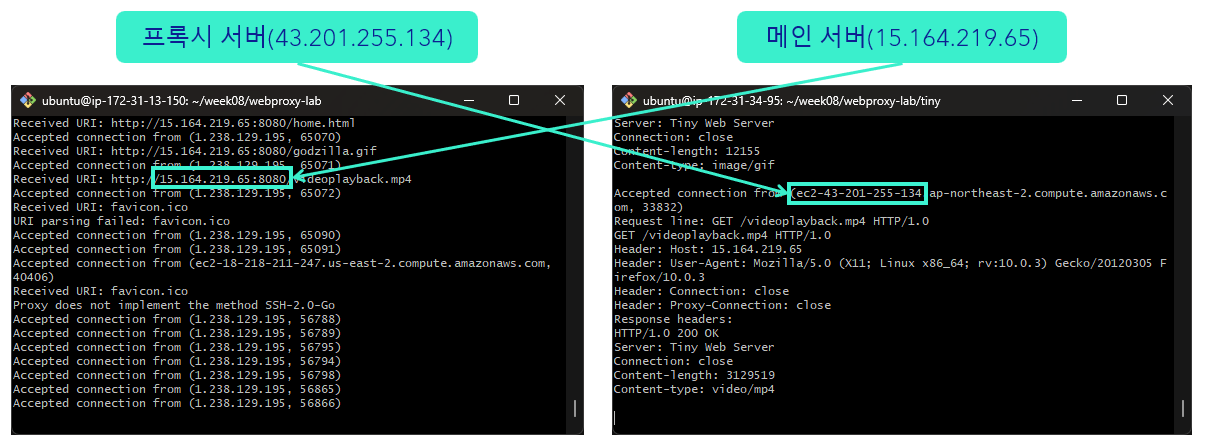
이를 구현하기 위해 AWS EC2 인스턴스 2개를 만들어 하나는 Tiny 서버, 하나는 프록시 서버로 두고, 내 컴퓨터를 client로 사용했다. 아래 사진에서 프록시 서버와 메인 서버가 연결된 것을 확인할 수 있다.
8-3. 한계와 개선
다만 위 구현은 아래처럼 메인 서버 주소를 URI로 직접 넣어줘야 했다.
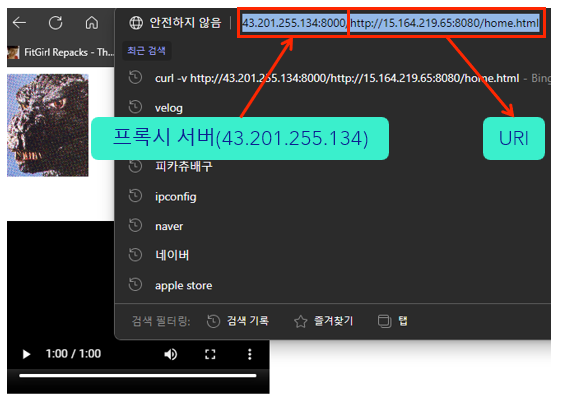
“이러면 프록시로서의 기능이 없는 것 아닌가?”라는 의문이 들어, doit의 parse_uri 호출 부분을
if (parse_uri(uri, hostname, path, port) < 0) {
    printf("URI parsing failed: %s\n", uri);
    return;
}
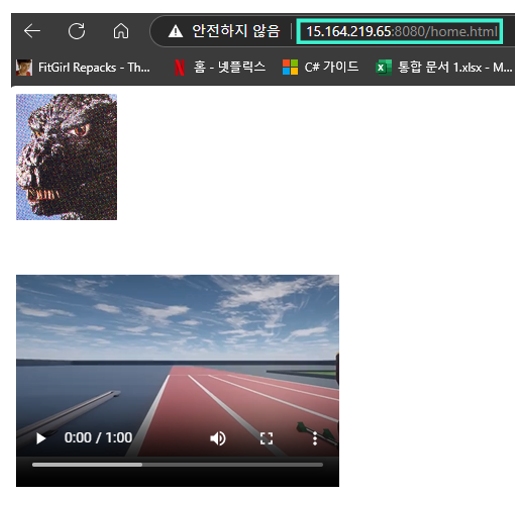
이미 알고 있던 EC2 인스턴스 IP로 고정하도록 바꿨다.
// 고정된 최종 서버 정보
strcpy(hostname, "15.164.219.65");
strcpy(port, "8080");
strcpy(path, uri);  // 예: "/home.html", "/godzilla.jpg"
그 결과 아래처럼 프록시로서의 기능을 충분히 하는 것을 확인했다.
9. 프록시 서버: 쓰레딩 + 캐싱
팀원들과 함께 쓰레딩과 캐싱 기능을 추가했다. 핵심 설계는 다음과 같다.
- 쓰레딩: 연결마다
Pthread_create로 스레드를 띄우고Pthread_detach로 자원을 자동 회수해, 여러 client를 동시에 처리한다 - 캐싱: URL을 키로 응답을 저장한다. 캐시 히트면 서버에 가지 않고 즉시 반환하고, 미스면 서버에서 받아 전달하며 동시에 캐싱한다
- 동시성 제어: 캐시 전체는
mutex로, 각 항목은pthread_rwlock(읽기/쓰기 락)으로 보호한다. 공간이 부족하면 LRU(가장 오래 안 쓰인 항목) 정책으로 제거한다
#include "csapp.h"
#include <limits.h>  /* ULONG_MAX */

#define MAX_CACHE_SIZE 1049000
#define MAX_OBJECT_SIZE 102400

/* 캐시 항목 */
typedef struct {
    char *url;               /* 캐시된 URL */
    char *content;           /* 캐시된 웹 객체 */
    size_t content_size;     /* 객체 크기 */
    unsigned long timestamp; /* LRU용 타임스탬프 */
    int is_valid;            /* 유효 여부 */
    int readers;             /* 읽는 스레드 수 */
    pthread_rwlock_t rwlock; /* 읽기/쓰기 락 */
} cache_entry_t;

/* 캐시 전체 */
typedef struct {
    cache_entry_t *entries;
    int num_entries;
    int max_entries;
    size_t current_size;
    pthread_mutex_t mutex;
} cache_t;

cache_t cache;

typedef struct { int connfd; } thread_args;

static const char *user_agent_hdr =
    "User-Agent: Mozilla/5.0 (X11; Linux x86_64; rv:10.0.3) Gecko/20120305 "
    "Firefox/10.0.3\r\n";

void doit(int connfd);
int parse_uri(char *uri, char *hostname, char *path, char *port);
void build_http_header(char *http_header, char *hostname, char *path);
void *thread(void *vargp);

void cache_init(int max_entries);
void cache_free(void);
cache_entry_t *cache_find(char *url);
void cache_read_complete(cache_entry_t *entry);
void cache_add(char *url, char *content, size_t content_size);
void cache_evict_lru(size_t required_size);
unsigned long get_timestamp(void);

int main(int argc, char **argv) {
    int listenfd, connfd;
    socklen_t clientlen;
    struct sockaddr_storage clientaddr;
    char port[10], host[MAXLINE];
    pthread_t tid;
    thread_args *args;

    if (argc != 2) {
        fprintf(stderr, "Usage: %s <port>\n", argv[0]);
        exit(1);
    }

    Signal(SIGPIPE, SIG_IGN); /* 끊긴 소켓 쓰기 시 종료 방지 */
    cache_init(100);
    printf("Cache initialized with max size %d bytes\n", MAX_CACHE_SIZE);

    listenfd = Open_listenfd(argv[1]);
    while (1) {
        clientlen = sizeof(clientaddr);
        connfd = Accept(listenfd, (SA *)&clientaddr, &clientlen);
        Getnameinfo((SA *)&clientaddr, clientlen, host, MAXLINE, port, MAXLINE, 0);
        printf("Accepted connection from (%s, %s)\n", host, port);

        args = (thread_args *)Malloc(sizeof(thread_args));
        args->connfd = connfd;
        Pthread_create(&tid, NULL, thread, args); /* 연결마다 스레드 */
    }

    cache_free();
    return 0;
}

void doit(int connfd) {
    char buf[MAXLINE], method[MAXLINE], uri[MAXLINE], version[MAXLINE];
    char hostname[MAXLINE], path[MAXLINE], port[10];
    rio_t rio_client;
    int serverfd;

    Rio_readinitb(&rio_client, connfd);
    if (!Rio_readlineb(&rio_client, buf, MAXLINE)) return;
    printf("Request line: %s", buf);
    sscanf(buf, "%s %s %s", method, uri, version);

    if (strcasecmp(method, "GET")) {
        printf("Proxy does not implement the method %s\n", method);
        return;
    }

    if (parse_uri(uri, hostname, path, port) < 0) {
        printf("URI parsing failed: %s\n", uri);
        return;
    }

    /* 전체 URL을 캐시 키로 사용 */
    char url_key[MAXLINE];
    sprintf(url_key, "http://%s:%s%s", hostname, port, path);

    /* 캐시 검색 */
    cache_entry_t *entry = cache_find(url_key);
    if (entry) { /* 캐시 히트 */
        printf("Cache hit for %s\n", url_key);
        Rio_writen(connfd, entry->content, entry->content_size);
        cache_read_complete(entry);
        return;
    }

    printf("Cache miss for %s\n", url_key);

    serverfd = Open_clientfd(hostname, port);
    if (serverfd < 0) {
        printf("Connection to server %s:%s failed.\n", hostname, port);
        return;
    }

    /* 서버로 보낼 요청 헤더 작성 (클라이언트 헤더 정제) */
    char request_hdrs[MAXLINE], host_hdr[MAXLINE], other_hdrs[MAXLINE];
    sprintf(request_hdrs, "GET %s HTTP/1.0\r\n", path);

    int is_host_hdr_seen = 0;
    other_hdrs[0] = '\0';

    while (Rio_readlineb(&rio_client, buf, MAXLINE) > 0) {
        if (!strcmp(buf, "\r\n")) break;
        if (!strncasecmp(buf, "Host:", 5)) {
            is_host_hdr_seen = 1;
            strcpy(host_hdr, buf);
        }
        else if (!strncasecmp(buf, "Connection:", 11) ||
                 !strncasecmp(buf, "Proxy-Connection:", 17)) {
            continue;
        }
        else if (!strncasecmp(buf, "User-Agent:", 11)) {
            continue;
        }
        else {
            strcat(other_hdrs, buf);
        }
    }

    if (!is_host_hdr_seen) {
        sprintf(host_hdr, "Host: %s\r\n", hostname);
    }

    strcat(request_hdrs, host_hdr);
    strcat(request_hdrs, user_agent_hdr);
    strcat(request_hdrs, "Connection: close\r\n");
    strcat(request_hdrs, "Proxy-Connection: close\r\n");
    strcat(request_hdrs, other_hdrs);
    strcat(request_hdrs, "\r\n");

    printf("Forwarding request to server %s:%s\n%s", hostname, port, request_hdrs);

    rio_t rio_server;
    Rio_readinitb(&rio_server, serverfd);
    Rio_writen(serverfd, request_hdrs, strlen(request_hdrs));

    /* 서버 응답을 client에 전달하며 캐싱 */
    size_t n;
    size_t total_size = 0;
    char cache_buf[MAX_OBJECT_SIZE];
    int cacheable = 1;

    while ((n = Rio_readnb(&rio_server, buf, MAXLINE)) > 0) {
        Rio_writen(connfd, buf, n);
        if (cacheable && total_size + n <= MAX_OBJECT_SIZE) {
            memcpy(cache_buf + total_size, buf, n);
            total_size += n;
        } else if (total_size + n > MAX_OBJECT_SIZE) {
            cacheable = 0; /* 최대 크기 초과 → 캐시 불가 */
        }
    }

    if (cacheable && total_size > 0) {
        cache_add(url_key, cache_buf, total_size);
        printf("Cached %zu bytes for %s\n", total_size, url_key);
    }

    Close(serverfd);
}

int parse_uri(char *uri, char *hostname, char *path, char *port) {
    char *hostbegin, *hostend, *pathbegin;

    if (strncasecmp(uri, "http://", 7) != 0) {
        if (uri[0] == '/') { /* 경로만 있는 경우 → localhost로 간주 */
            strcpy(hostname, "localhost");
            strcpy(path, uri);
            strcpy(port, "80");
            return 0;
        }
        fprintf(stderr, "Error: Invalid URI format (no http://): %s\n", uri);
        return -1;
    }

    hostbegin = uri + 7;
    pathbegin = strchr(hostbegin, '/');

    if (pathbegin) {
        hostend = pathbegin;
        strcpy(path, pathbegin);
    } else {
        hostend = hostbegin + strlen(hostbegin);
        strcpy(path, "/");
    }

    char hostcopy[MAXLINE];
    strncpy(hostcopy, hostbegin, hostend - hostbegin);
    hostcopy[hostend - hostbegin] = '\0';

    char *portPos = strchr(hostcopy, ':');
    if (portPos) {
        *portPos = '\0';
        strcpy(hostname, hostcopy);
        strcpy(port, portPos + 1);
    } else {
        strcpy(hostname, hostcopy);
        strcpy(port, "80");
    }

    printf("Parsed URI - Host: '%s', Path: '%s', Port: '%s'\n", hostname, path, port);
    return 0;
}

void build_http_header(char *http_header, char *hostname, char *path) {
    char buf[MAXLINE];

    sprintf(http_header, "GET %s HTTP/1.0\r\n", path);
    sprintf(buf, "Host: %s\r\n", hostname);
    strcat(http_header, buf);
    strcat(http_header, user_agent_hdr);
    strcat(http_header, "Connection: close\r\n");
    strcat(http_header, "Proxy-Connection: close\r\n\r\n");
}

/* 스레드: 연결 하나를 처리 */
void *thread(void *vargp) {
    thread_args *args = (thread_args *)vargp;
    int connfd = args->connfd;

    Pthread_detach(pthread_self()); /* 자원 자동 회수 */
    Free(vargp);

    doit(connfd);
    Close(connfd);
    return NULL;
}

void cache_init(int max_entries) {
    cache.entries = (cache_entry_t *)Calloc(max_entries, sizeof(cache_entry_t));
    cache.num_entries = 0;
    cache.max_entries = max_entries;
    cache.current_size = 0;
    pthread_mutex_init(&cache.mutex, NULL);

    for (int i = 0; i < max_entries; i++) {
        cache.entries[i].is_valid = 0;
        cache.entries[i].url = NULL;
        cache.entries[i].content = NULL;
        cache.entries[i].content_size = 0;
        cache.entries[i].timestamp = 0;
        cache.entries[i].readers = 0;
        pthread_rwlock_init(&cache.entries[i].rwlock, NULL);
    }
}

void cache_free(void) {
    pthread_mutex_lock(&cache.mutex);
    for (int i = 0; i < cache.max_entries; i++) {
        if (cache.entries[i].is_valid) {
            Free(cache.entries[i].url);
            Free(cache.entries[i].content);
        }
        pthread_rwlock_destroy(&cache.entries[i].rwlock);
    }
    Free(cache.entries);
    pthread_mutex_unlock(&cache.mutex);
    pthread_mutex_destroy(&cache.mutex);
}

unsigned long get_timestamp(void) {
    struct timeval tv;
    gettimeofday(&tv, NULL);
    return tv.tv_sec * 1000000 + tv.tv_usec;
}

cache_entry_t *cache_find(char *url) {
    pthread_mutex_lock(&cache.mutex);
    for (int i = 0; i < cache.max_entries; i++) {
        if (cache.entries[i].is_valid && strcmp(cache.entries[i].url, url) == 0) {
            pthread_rwlock_rdlock(&cache.entries[i].rwlock);
            cache.entries[i].timestamp = get_timestamp();
            pthread_mutex_unlock(&cache.mutex);
            return &cache.entries[i];
        }
    }
    pthread_mutex_unlock(&cache.mutex);
    return NULL;
}

void cache_read_complete(cache_entry_t *entry) {
    pthread_rwlock_unlock(&entry->rwlock);
}

void cache_evict_lru(size_t required_size) {
    unsigned long min_timestamp = ULONG_MAX;
    int lru_index = -1;

    for (int i = 0; i < cache.max_entries; i++) {
        if (cache.entries[i].is_valid && cache.entries[i].timestamp < min_timestamp) {
            min_timestamp = cache.entries[i].timestamp;
            lru_index = i;
        }
    }

    if (lru_index != -1) {
        pthread_rwlock_wrlock(&cache.entries[lru_index].rwlock);
        Free(cache.entries[lru_index].url);
        Free(cache.entries[lru_index].content);
        cache.entries[lru_index].url = NULL;
        cache.entries[lru_index].content = NULL;
        cache.entries[lru_index].is_valid = 0;
        cache.current_size -= cache.entries[lru_index].content_size;
        cache.num_entries--;
        pthread_rwlock_unlock(&cache.entries[lru_index].rwlock);
    }
}

void cache_add(char *url, char *content, size_t content_size) {
    if (content_size > MAX_OBJECT_SIZE) return;

    pthread_mutex_lock(&cache.mutex);

    while (cache.current_size + content_size > MAX_CACHE_SIZE ||
           cache.num_entries >= cache.max_entries) {
        cache_evict_lru(content_size);
    }

    int empty_slot = -1;
    for (int i = 0; i < cache.max_entries; i++) {
        if (!cache.entries[i].is_valid) { empty_slot = i; break; }
    }

    if (empty_slot == -1) {
        pthread_mutex_unlock(&cache.mutex);
        return;
    }

    pthread_rwlock_wrlock(&cache.entries[empty_slot].rwlock);
    cache.entries[empty_slot].url = strdup(url);
    cache.entries[empty_slot].content = Malloc(content_size);
    memcpy(cache.entries[empty_slot].content, content, content_size);
    cache.entries[empty_slot].content_size = content_size;
    cache.entries[empty_slot].timestamp = get_timestamp();
    cache.entries[empty_slot].is_valid = 1;
    cache.current_size += content_size;
    cache.num_entries++;
    pthread_rwlock_unlock(&cache.entries[empty_slot].rwlock);
    pthread_mutex_unlock(&cache.mutex);
}